
🖥️ 8 Signs Your MSI Screen Needs Replacing
MSI displays fail in gaming-specific ways. If you recognise any of these, our free panel-vs-motherboard diagnosis tells you exactly which part is at fault — before you spend a dirham:
Cracked or shattered panel
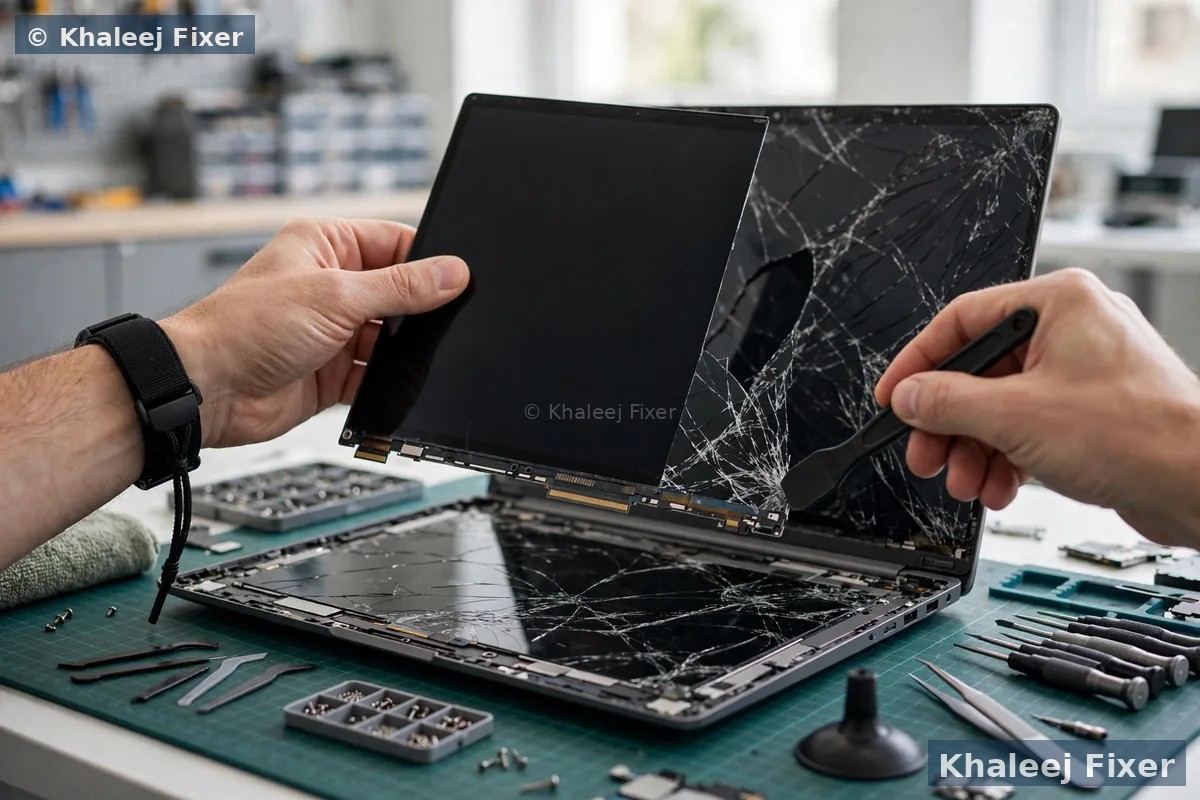
One drop, one slammed lid, one bag squeezed too hard — and your GF65 shows spiderweb cracks with bleeding ink spots. Cracked LCDs can’t be repaired, only replaced. Keep using it and dead pixels spread, pressure lines grow, and glass fragments risk damaging the backlight layer beneath. This is our most common MSI screen job, and most models are replaced same-day in about an hour. Full screen service hub: laptop screen replacement Dubai →
Flickering — especially in games
Katana GF66 flickering only when gaming is a known MSI issue: in MSHybrid mode, Variable Refresh Rate (VRR) stays on even for games that don’t support it — MSI’s own guidance says disable VRR in Windows Display settings and in Intel Graphics Command Center. If flicker persists after the settings fix, it’s a failing panel or loose display cable — we test both free. See MSI laptop repair in Dubai →
Vertical or horizontal lines
A single bright vertical line down your Stealth’s display, or bands of horizontal lines across the Katana. Lines usually mean the panel’s column/row drivers have failed — occasionally it’s the eDP cable, which is why we test before quoting. Lines never heal; they multiply. Caught early, a panel swap returns the display to perfect.
Black screen, but the laptop runs
Power light on, fans spinning, you can hear Windows booting — but the screen stays black. Plug in an HDMI monitor: if you see your desktop, the panel, backlight or display cable is dead (good news — all replaceable). If the external monitor is black too, it’s the GPU or motherboard — a different repair entirely, and exactly what our motherboard diagnosis separates for free.
Screen goes dim or dies when you tilt the lid
The classic GF Thin hinge-cable fault: the display dims, flickers or cuts out as you open or close the lid. MSI’s GF63/GF65/GF75 route the eDP cable tightly through thin hinges, and thousands of lid cycles wear it out. The fix is a cable re-seat or replacement — far cheaper than a full panel, which is why diagnosis first matters.
Very dim image (flashlight test)
Shine a phone torch at the screen: if you can faintly see your desktop, the panel works but the backlight circuit has failed. On LED-backlit MSI panels, backlight and panel come as one unit — replacement is the fix, and we fit a panel with the correct brightness rating (nits) so it doesn’t come back dimmer than your MSI left the factory.
Wrong colours / washed-out display
Your GS66 suddenly looks faded, pinkish, or stuck in a permanent night-mode tint. If colour profiles and drivers are clean, the panel’s colour filter layers or the eDP signal are degrading. For Creator-series owners who colour-grade for a living, a correct-gamut replacement panel matters — a cheap generic will never show accurate colour again.
Dead pixels spreading
One stuck pixel is annoying; a growing cluster of dead or stuck pixels means the panel’s transistor layer is failing. Pixels never come back — and spreading dead pixels signal a panel that’s only going to get worse. If the count bothers you in games or design work, replacement is the only fix. Every panel we fit is dead-pixel checked before it leaves the shop.
Not sure whether it’s the panel, the cable, the backlight or the motherboard? That’s exactly what the free diagnosis is for — you never pay just to find out. MSI laptop repair in Dubai →
🎯 Why Panel Matching Is Everything on a Gaming MSI
Here’s what most Dubai repair shops won’t tell you: laptop screens are not interchangeable Lego bricks. Your MSI’s panel is defined by six things — screen size (15.6″ or 17.3″), resolution (FHD/QHD/4K), refresh rate (60Hz, 144Hz, 240Hz or 360Hz), panel technology (IPS vs TN), connector (30-pin or 40-pin eDP), and the exact panel part number (like Innolux N156HCE-EN1 on a Katana GF66). Fit the wrong one and the machine silently downgrades: a 144Hz MSI with a 60Hz panel feels laggy in games even though the GPU is identical, and a wrong-pin connector physically won’t seat — or worse, seats badly and fries the display circuit.
That’s why our panel-match guarantee exists. We read your MSI’s exact model, pull the correct panel spec, and fit a panel that matches every one of the six — same refresh rate, same resolution, same panel type, same pin-count. A GF65 that shipped 144Hz leaves us at 144Hz. A 240Hz Raider stays 240Hz. Your brightness (nits), viewing angles and colour gamut come back exactly as the factory intended. If a shop quotes you without asking your MSI’s exact model and panel spec, they haven’t matched anything — and that’s how “screen replacements” quietly ruin gaming laptops.
🔍 Is It the Screen, the Cable — or the Motherboard/GPU?
The question that decides whether you need a screen replacement at all. Before quoting anything, we run the three-minute separation test — free, every time: connect an external monitor via HDMI. If your desktop shows perfectly on the external display, the GPU and motherboard are healthy — the fault is in the panel, backlight or eDP display cable, all of which we replace. If the external monitor shows the same lines, flicker or black screen, the fault is in the GPU or motherboard — and replacing the screen would have been money wasted. Then we test the display cable separately (re-seat, then replace) before touching the panel, because a GF Thin’s dim-when-tilting fault is a worn hinge cable — a cheaper fix than a panel.
Honest diagnosis is why MSI owners come back: motherboard-level diagnosis → when it IS the board, and full MSI laptop repair in Dubai → for everything else. You pay for the right repair, never the wrong one.
💻 Every MSI Series — The Correct Panel, Matched to Your Model
From budget GF Thin to flagship Raider — the right panel for your exact MSI, 144Hz through 360Hz:
Gaming series (GF Thin, Katana, Cyborg, Stealth, GL Leopard, Sword, Pulse, Alpha, Raider) ship with high-refresh panels — 144Hz, 240Hz or 360Hz — and that’s exactly what we fit back: same Hz, same resolution, same 40-pin eDP, same IPS/TN type. Prestige and Modern run 60Hz IPS panels tuned for battery life and colour; Creator Z16/Z17 carry high-gamut QHD+ panels for colour work — where we match colour accuracy, not just size. Find your exact model on the underside sticker (e.g. GF65 10UE) or in MSI Center, and WhatsApp it to us — we’ll confirm the panel spec before you arrive. Complete MSI servicing: MSI laptop repair Dubai → · Battery issues? MSI battery replacement Dubai → · Other brands coming: Toshiba screen replacement Dubai →
⚠️ Genuine-Quality vs Cheap MSI Panels — What the Price Difference Really Buys
Scroll any marketplace and you’ll find “MSI screen” listings at suspiciously low prices. Here’s what those usually are: 60Hz panels sold for 144Hz machines (your games instantly feel laggy), lower-brightness panels (your “new” screen looks dimmer than before), TN panels replacing IPS ones (colours wash out the moment you tilt the screen), and reject panels with dead pixels and backlight bleed that fail within months. The listing never says any of this — it just says “compatible”.
Our rule: we fit genuine-quality panels matched to your exact MSI — correct refresh rate, correct resolution, correct pin-count, correct brightness, dead-pixel checked before fitting — and we back every one with our 2-month warranty. It costs more than the cheapest listing and it lasts like the original. If someone offers you an MSI screen replacement at a price that seems too good to be true, ask which refresh rate, pin-count and panel part number they’re fitting — then ask us.
🔧 Our MSI Screen Replacement Process — 4 Steps, Done in About an Hour
Most MSI screen replacements are completed while you wait:
Free panel-vs-motherboard diagnosis
External-monitor separation test, eDP cable check, backlight assessment, refresh-rate and panel-spec readout. We confirm whether you need a panel, a cable, or a board-level repair — fixed quote, zero charge for diagnosis, and honest news if replacement isn’t the answer.
Exact panel sourced — spec matched
Panel matched to your MSI’s six specs: size, resolution, refresh rate (144/240/360Hz), IPS/TN, 40-pin or 30-pin eDP, and panel part number. Common GF Thin and Katana 144Hz panels are stocked for same-day replacement; Stealth, Raider and Creator panels sourced fast with an honest timeline upfront.
Careful bezel + hinge disassembly
MSI bezels clip, they don’t screw — rushed hands crack them. We open with proper spudgers, route the new eDP cable through the hinges correctly (the GF Thin weak point), seat the connector fully, and re-fit the bezel flush. No stripped screws, no cracked plastic, no pinched cables.
Full testing + display calibration
New panel installed, then tested for dead pixels, backlight bleed, colour uniformity and full refresh rate (we verify the display is actually running at 144Hz/240Hz in Windows, not just fitted). Brightness matched, old panel returned to you, and our 2-month warranty covers the replacement. Battery running hot after screen work? We also do MSI battery replacement.
🤔 Replace the Screen or Buy a New MSI?
The question every MSI owner with a broken display asks. Our honest answer — as a shop that could happily charge you either way:
Still undecided? The free diagnosis includes our honest assessment — including “don’t repair this one”. Ask us on WhatsApp →
🛡️ Make Your New MSI Screen Last — Hinges + Refresh Rate
Two things decide how long an MSI display lives. First: the hinges. Always open the lid from the centre, not the corner — corner-opening twists the bezel and wears the eDP cable inside the hinge, which is exactly how GF Thin machines develop the dim-when-tilting fault. Never slam the lid, and never carry the laptop by the screen. Second: after any replacement, check Windows Display → Advanced display and confirm the refresh rate is set to your panel’s maximum (144Hz/240Hz) — Windows sometimes defaults new panels to 60Hz, and owners think the replacement “feels worse” when it’s just a settings click.
Beyond that: keep drinks away from the keyboard (liquid kills backlight circuits fast), clean the screen only with a microfibre cloth — never paper towels, which scratch the coating — and if you game with VRR flicker in MSHybrid mode, disable Variable Refresh Rate as MSI’s own guidance describes. We verify the refresh rate and hinge cable on every replacement, free. Other brands too: Toshiba screen replacement Dubai →
💰 What Affects MSI Screen Replacement Cost
Transparent pricing — your final quote is confirmed after the free diagnosis, never a surprise at pickup. These are the factors that move the price:
💬 Why MSI Owners Choose Khaleej Fixer
📍 Free Pickup — Dubai & Sharjah
MSI screen replacement with free pickup and delivery — or walk in:
📍 Visit us: 41 St, Industrial Area 2, Sharjah, UAE — open 7 days, 11 AM to 11 PM. Full MSI servicing: MSI laptop repair Dubai → · Battery dying too? MSI battery replacement Dubai →
❓ MSI Laptop Screen Replacement FAQs — Dubai
How much does MSI laptop screen replacement cost in Dubai?
It depends on your MSI’s panel — refresh rate, size and resolution. A 15.6″ 144Hz GF Thin panel costs less than a 240Hz Raider or QHD Creator panel. Our price list is transparent, and your final quote is confirmed after the free diagnosis with no hidden charges.
My MSI screen flickers — is it the panel, the cable, or drivers?
Check settings first: on many MSI gaming laptops, flickering in games comes from Variable Refresh Rate in MSHybrid mode — disable VRR in Windows Display settings and in Intel Graphics Command Center. If flicker continues everywhere, it’s the panel or eDP cable, which our free diagnosis separates.
Can you replace my 144Hz MSI screen with a real 144Hz panel?
Yes — that’s our panel-match guarantee. We match refresh rate, resolution, panel type and pin-count to your exact MSI, so 144Hz stays 144Hz and 240Hz stays 240Hz. Beware shops that fit cheap 60Hz panels into gaming machines — your games feel laggy even though the GPU is unchanged.
My MSI shows a black screen but the laptop is running — screen or motherboard?
Connect an external monitor via HDMI: if your desktop appears, it’s the panel, backlight or display cable — all replaceable. If the external display is black too, it’s the GPU or motherboard. Our free diagnosis runs this separation test so you pay for the right repair. Board faults: motherboard repair →
How long does MSI laptop screen replacement take?
Most MSI screen replacements are done in about an hour, same-day — common GF Thin and Katana 144Hz panels are stocked. Stealth, Raider and Creator panels may need fast sourcing; we always give you an honest timeline before you commit.
Will replacing the screen delete my files, games, or Windows?
No — screen replacement doesn’t touch your storage at all. Your files, Windows, game libraries, drivers and MSI Center profiles remain exactly as they were.
My GF65 screen dims when I tilt the lid — cable or panel?
Almost certainly the eDP hinge cable — GF Thin models route it tightly through thin hinges and it wears with lid cycles. We re-seat or replace the cable first; it’s a cheaper fix than a full panel, which is why diagnosis comes before any quote.
Genuine MSI screen or a compatible one — which should I choose?
Choose a genuine-quality panel matched to your exact MSI spec — which is what we fit. Cheap “compatible” listings are often lower refresh rate, dimmer, or the wrong pin-count. Every panel we fit is dead-pixel checked and backed by our 2-month warranty.
🔗 Related repairs: screen sorted but the battery dying too? See our MSI battery replacement in Dubai — and for the complete service, our laptop screen replacement Dubai hub covers every brand, with Toshiba screen replacement coming next.
Get Your MSI’s Display Back — 144Hz, Like New
One message is all it takes. Free panel diagnosis · ~1 hour replacement · Exact 144Hz/240Hz panel match · 2-month warranty.
💬 WhatsApp: +971 506 757 156 📞 Call Now
📍 41 St, Industrial Area 2, Sharjah, UAE — open 7 days, 11 AM – 11 PM